Building a Scalable Personalization Framework for Customer and Partner Content
At McAfee, I developed the content architecture and personalization logic for the consumer product content. The solution enabled writers to deliver dynamically tailored Help from a single content source across both direct-to-consumer (DTC) and partner channels based on the products and features installed.
Delivered content was limited to predefined product suites, a static model that became increasingly difficult to scale as new offerings and product combinations were introduced. Although partners could deliver unique combinations of products and features, the Help remained tied to the predefined product suites and did not reflect what customers actually had installed. This static publishing model limited McAfee’s ability to deliver relevant Help across a growing range of customer experiences, particularly for the partner channel, which represented 65% of company bookings.
The Personalization Engine
The personalization engine (SDL LiveContent) dynamically filters content based on each customer’s product configuration:
Help URL parameters identify personalization criteria such as language, operating system, partner features, and installed products.
Writers apply corresponding conditions to content that varies based on those criteria.
JavaScript mapping files connect the URL parameters and partner build settings to the conditions applied to the content.
When customers request Help, the engine uses those mappings to display only the content associated with their installation.
HOW THE PERSONALIZATION ENGINE WORKS
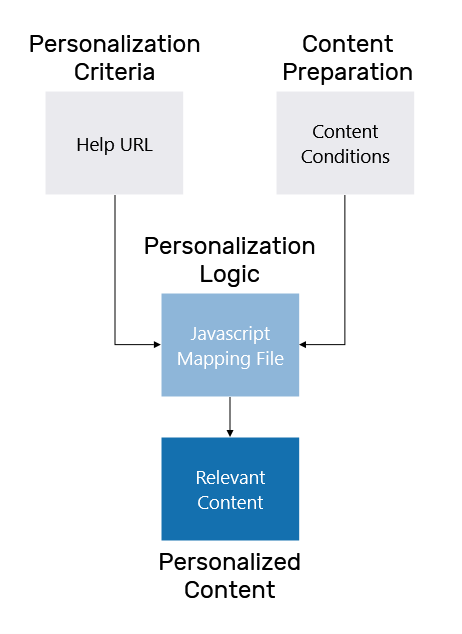
Personalization Criteria
The URL parameters in Help calls represent these personalization criteria:
Locale (lang) – Language version of the content.
Operating system (os) – Operating system version.
Affiliate (affid) – Identifies the DTC or partner product configuration and build.
Entitlement (entitledlist) – List of entitled components.
Content Preparation
Because the Consumer product content already followed topic-based, modular writing principles, most of it was ready for personalization.
Updates focused on content that described differences across operating systems, products, or other personalization attributes. These conditional statements were replaced with the corresponding conditions, so customers only saw content relevant to them.
| BEFORE | AFTER |
|---|---|
In Windows 8, tap the desired item. | |
If you installed McAfee Total Protection, you can mark systems as intruders. |
Personalization Logic
I defined the personalization logic through JavaScript mapping files that connected URL parameters and partner build settings to the corresponding content conditions.
Standard Consumer Builds
For DTC products, one manually created JavaScript file defined the mappings for the standard product configurations and was included with the standard software package.
JAVASCRIPT MAPPING EXAMPLE: OPERATING SYSTEM
The mapping translates the operating system value passed by the software to the corresponding condition applied to the content.
if (os == 'xp') {
	xmlstr += "<feature name='SoftwarePlatform' value=' Windows_XP '/>"
}
Custom Partner Builds
For partners, each custom build required its own personalization filter. When a partner selected the products, features, and other options for a build, the build system generated the corresponding JavaScript mapping file and included it with the software. The Help experience could therefore reflect the same configuration choices used to create the partner product..
JAVASCRIPT MAPPING EXAMPLE: EXCLUDED PARTNER FEATURES
The mapping translates partner build selections into the corresponding conditions applied to the content.
function McAfeeGetDefaultPartnerBuild(lcstr)	{
    var xmlstr = "";
    xmlstr = lcstr;
lcstr += "<feature name= 'Partner_Feature' value=' MNM-Show Intruder alert? '/>";
lcstr += "<feature name= 'Partner_Feature' value=' MNM-Show Learning Mode Completion Alert '/>";
lcstr += "<feature name= 'Partner_Feature' value=' MSADP-Show Safe Share Icon ? '/>"
    return (lcstr);
}
Results: Personalized Content
The resulting architecture separated content from individual product configurations. A single content source supported multiple DTC product suites and custom partner builds, with the personalization engine dynamically filtering content based on each customer’s software configuration.
Content could be published once and personalized at runtime, allowing McAfee to scale Help across new product and partner configurations without creating and maintaining separate content sets for every experience.